Demo mode
The demo device is a simulated serial device for exploring termapy without hardware. See Installation for how to start it.
Entering demo mode
Or from within termapy:
/demo: switch to the demo config (creates it if needed)/demo.force: reset demo to defaults and switch to it
VT100 demo (interactive ANSI UI)
Paired with --vt100, --demo connects to a different simulated device (the
reserved DEMO_VT100 port): instead of the line-oriented AT device above, it
draws a colored, cursor-addressed menu (arrow keys / j/k to move, Enter
to open) and a live status dashboard (q returns). It exists to show what
VT100 passthrough renders that plain line output can't. Quit with Ctrl-]. See
VT100 mode.
What you get
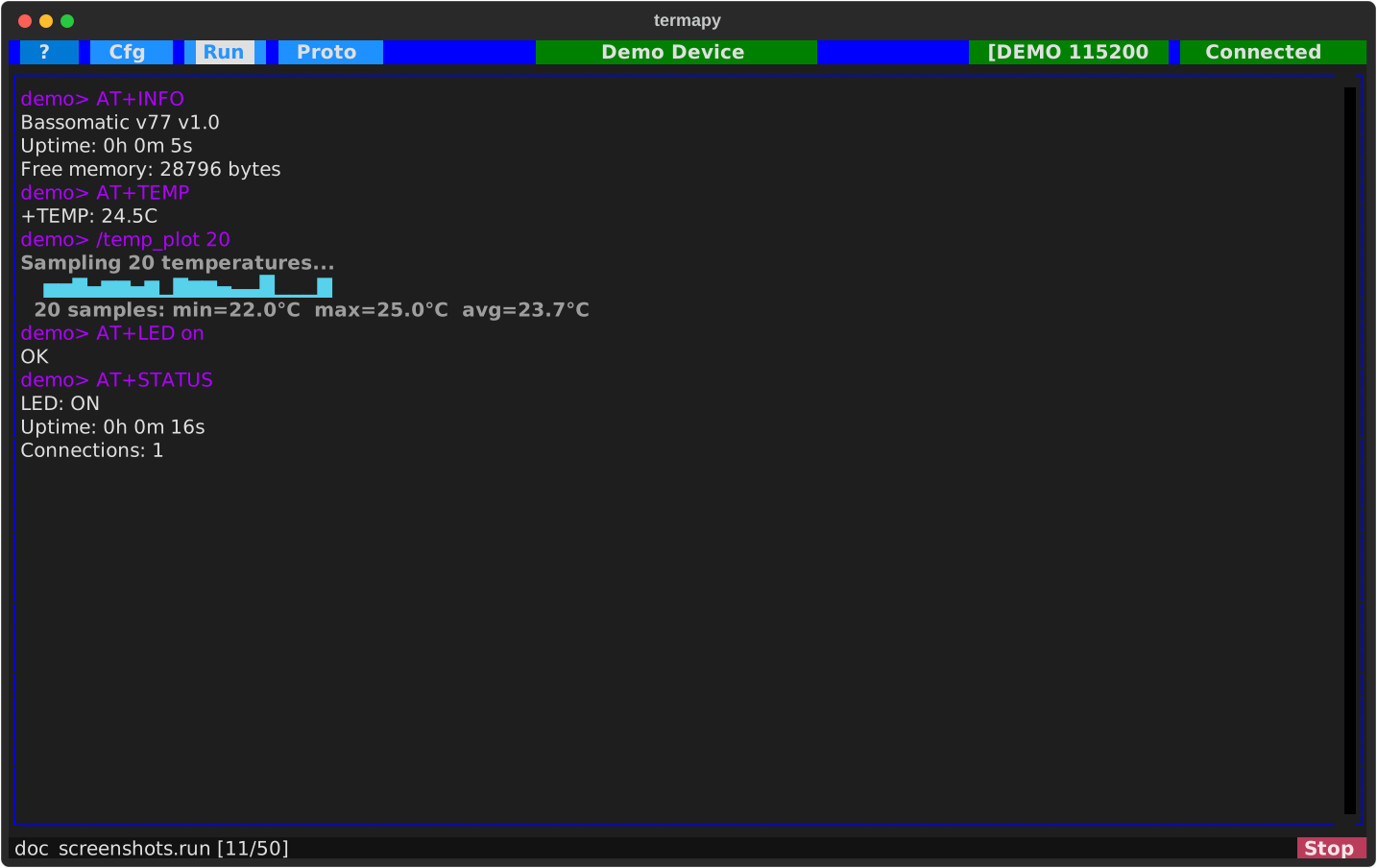
The demo creates a complete project at termapy_cfg/demo/ with:
- A simulated device called BASSOMATIC-77 (the natural successor to Dan Aykroyd's '76) that responds to AT commands, GPS/NMEA queries, and binary Modbus RTU frames
- Toolbar buttons: Demo Help, AT Demo, Info, Probe, TempPlot
- Scripts: welcome, at_demo, gps_demo, smoke_test, status_check, var_demo, expect_test, crc_tour, doc_screenshots
- Protocol test files: at_test, bitfield_inline, modbus_inline
- Plugins: cmd (custom shortcut), probe (device query), temp_plot (sparkline), traffic (RX/TX byte tap)
Device commands
The simulated device supports three protocols:
AT commands (text)
| Command | Response |
|---|---|
AT |
OK (connection test) |
AT+INFO |
Device info, uptime, free memory |
AT+TEMP |
Simulated temperature reading (22-25C) |
AT+LED <on\|off> {--blink} |
Set the LED (optionally blinking) |
AT+STATUS |
LED state, uptime, connections |
AT+NAME? / AT+NAME=val |
Query or set device name |
AT+BAUD? / AT+BAUD=val |
Query or set baud rate |
AT+EOL? / AT+EOL=cr\|lf\|crlf |
Switch the device's response line ending (test /term.eol.rx) |
AT+PROD-ID |
Product ID (BASSOMATIC-77) |
AT+RESET |
Simulated reboot sequence |
AT+HELP |
Command help (human-readable list) |
AT+HELP.JSON |
Device command help (JSON) |
AT+TEXTDUMP <n> |
Emit text readings |
AT+BINDUMP {type} <n> {--crc} |
Emit binary records |
AT+RAMP |
Deterministic saw-wave readings |
AT+FS.LIST / AT+FS.INFO / AT+FS.DELETE <file> |
Simulated file system (see File transfer) |
AT+XMODEM=RECV\|SEND, AT+YMODEM=RECV\|SEND |
Start a transfer (see File transfer) |
AT+RND |
Emit one random catalog-CRC packet (not listed in AT+HELP) |
AT+RND.CUSTOM |
Emit one packet with a secret poly (not listed in AT+HELP) |
AT+RND.CUSTOM.REVEAL |
Print the secret poly's Rocksoft params (not listed in AT+HELP) |
mem <addr> [len] |
Hex memory dump |
GPS / NMEA
| Command | Response |
|---|---|
$GPGGA |
Position fix (lat, lon, altitude, satellites) |
$GPRMC |
Recommended minimum nav (pos, speed, date) |
$GPGSA |
DOP and active satellites |
$GPGSV |
Satellites in view |
Modbus RTU (binary)
Use /proto.send with hex bytes (CRC included):
/proto.send 01 03 00 00 00 01 84 0A       # read 1 register
/proto.send 01 06 00 05 04 D2 1B 56       # write register 5 = 1234
/proto.send 01 03 00 05 00 01 94 0B       # read back register 5
Supports function codes 0x03 (read holding registers) and 0x06 (write single register) with CRC16 enforced.
Data capture commands
Text capture
Binary capture: mixed record to CSV
/cap.struct mixed.csv fmt=Label:S1-10 Counter:U11 Val16:U13-12 Val32:U17-14 Temp:F21-18 records=20 cmd=AT+BINDUMP 20
Binary capture: single type
Demo plugins
| Plugin | Command | What it does |
|---|---|---|
| cmd.py | /cmd |
Custom shortcut, wraps a device command |
| probe.py | /probe |
Device survey, send/receive cycle with output |
| temp_plot.py | /temp_plot |
Sample temperature N times, draw ASCII sparkline |
| traffic.py | /traffic.* |
RX/TX byte tap: count, hex-dump, rate, snoop (passive observer pattern) |
probe.py is the best starting template for plugins that send and parse a single
device response. traffic.py is the template for plugins that need to watch
the byte stream without disrupting normal operation -- it demonstrates the
ctx.serial.rx_observer() / ctx.serial.tx_observer() context managers (see
Writing Plugins for the full pattern).
/traffic.* subcommands
| Subcommand | Args | What it does |
|---|---|---|
/traffic.count |
<cmd> |
Run a command and report TX/RX bytes during it |
/traffic.hexdump |
<file> [duration] |
Tee timestamped hex of all I/O to a file (default 5s) |
/traffic.rate |
[duration] |
Bytes/sec rate over a window (default 5s) |
/traffic.snoop |
<hex> [timeout=<dur>] |
Block until a hex byte pattern appears in RX |
Examples against the demo:
demo> /traffic.count AT+INFO
  TX: 7  RX: 12  bytes

demo> /traffic.rate 3s
  Sampling for 3.0s...
  TX: 0 bytes (0.0 B/s)
  RX: 28 bytes (9.3 B/s)

demo> /traffic.hexdump capture.log 10s

demo> /traffic.snoop 4F 4B timeout=2s    # wait for "OK" in RX
  Matched 4f4b at offset 14