Device help integration
If your target device can publish a v2 profile JSON over the wire,
termapy will load it and make every declared command available to the
LLM (via MCP), to /help, and to the CLI/TUI completer. The device
feels integrated into the terminal because its full typed contract is
right there alongside termapy's own commands.
How it works
- Add a command to your firmware that returns a v2 profile JSON.
- Load it on demand:
/profile.load cmd=<command>. - Or auto-load on connect by adding that to
on_connect_cmd(or one of the per-mode variantsmcp_on_connect_cmd,tui_on_connect_cmd,cli_on_connect_cmd).
/profile.load installs the JSON as the active profile. Everything
that consults the active profile -- the MCP catalog, the dispatch
executor's typed-arg validation, transport rules, error detection,
/help, autocompletion -- sees the device's full contract.
Once loaded, the active profile can be saved to disk with
/profile.save; the default path is <cfg_dir>/<cfg_name>.profile.json
so the next connect picks it up automatically via the profile_path
cfg key (see config.md) -- that key resolves to the
default path when unset, so the saved file is found without any
extra configuration. Promotes a device-fetched profile to a
checked-in file you can hand-edit.
JSON format
The device must return a v2 profile JSON object. See authoring-profiles.md for the full schema; the minimum is:
{
    "profile_version": 2,
    "commands": {
        "AT+INFO": {"help": "Device information"},
        "AT+LED":  {"help": "Control LED", "args": "<on|off>"}
    }
}
Each command entry can carry:
help(required) -- one-line description.args(optional) -- argument spec, for human display.long_help(optional) -- multi-line prose for/help <command>.flags(optional) -- flag map (canonical + alias entries).safety(optional) --readonly/safe/mutable/destructive, in increasing order of caution (see Authoring profiles).enabled(optional, default true) -- audit gate. Drafts emit false.send_template,typed_args,response-- profile-aware dispatch fields. See the authoring guide for details.
A device that publishes the full v2 contract gets typed-arg
validation, structured response parsing, and the destructive-command
confirmation gate for free. A device that publishes only help +
args still works -- termapy treats the profile as documentation
without the executor's structured features.
Optional top-level blocks the device may publish:
profile_version,profile_revision,profile_date-- metadata.transport-- baud rate, line endings, encoding, default timeouts. Applied to the live cfg on load (with a per-field divergence warning if cfg and profile disagreed).error_detection-- regex pattern that flags device-reported errors in responses.types-- profile-local type vocabulary (enum / int_range / float_range / str_length / pattern / format_spec). Referenced by name fromtyped_args[i].type.
The JSON can be a single line or pretty-printed. Termapy scans the
response for the first { and parses from there, so preamble text
(echo, status messages) before the JSON is fine.
Commands
| Command | Description |
|---|---|
/profile.load <path> |
Load a profile from a file |
/profile.load cmd=<command> |
Fetch a profile from the device |
/profile.load |
Reload the current source (file or cmd) |
/profile.save |
Save active profile to <cfg_dir>/<cfg_name>.profile.json |
/profile.save <path> |
Save active profile to an explicit path |
/profile.unload |
Clear the active profile |
/profile.info |
Show metadata of the active profile + cfg drift |
/profile.validate <path> |
Schema-check a profile file |
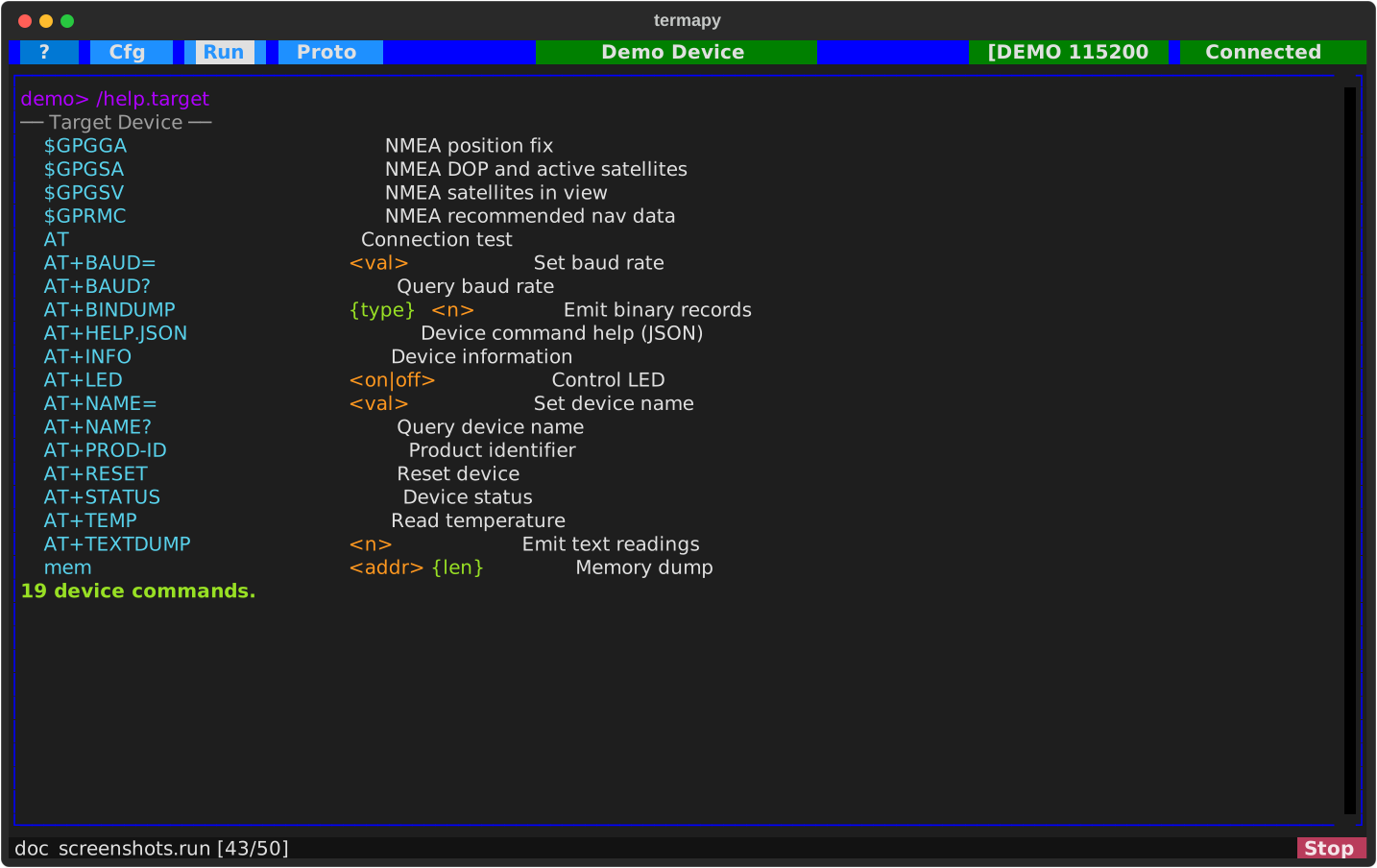
/help.target |
List the active profile's device commands |
Implementing on your device
The simplest implementation: have a command that prints a JSON string to the serial port. For an AT command set, something like:
if (strcmp(cmd, "AT+HELP.JSON") == 0) {
    printf("{\"profile_version\":2,\"commands\":{");
    printf("\"AT+INFO\":{\"help\":\"Device info\"},");
    printf("\"AT+TEMP\":{\"help\":\"Read temperature\"},");
    printf("\"AT+LED\":{\"help\":\"Control LED\",\"args\":\"<on|off>\"}");
    printf("}}\r\n");
}
Or build it from your command table at runtime so it stays in sync.
Auto-load on connect
If you want the profile to load automatically every time termapy
connects, put the /profile.load cmd=... step in your cfg's
on_connect_cmd (or the MCP-specific variant):
Per-mode variants (tui_on_connect_cmd, cli_on_connect_cmd,
mcp_on_connect_cmd) let you have different behavior per host.
Demo
The bundled demo device publishes a v2 profile via AT+HELP.JSON.
Run the demo, then /profile.load cmd=AT+HELP.JSON -- the device
commands appear in /help, autocomplete, and (in MCP) the catalog
with their full typed contract.