Variables
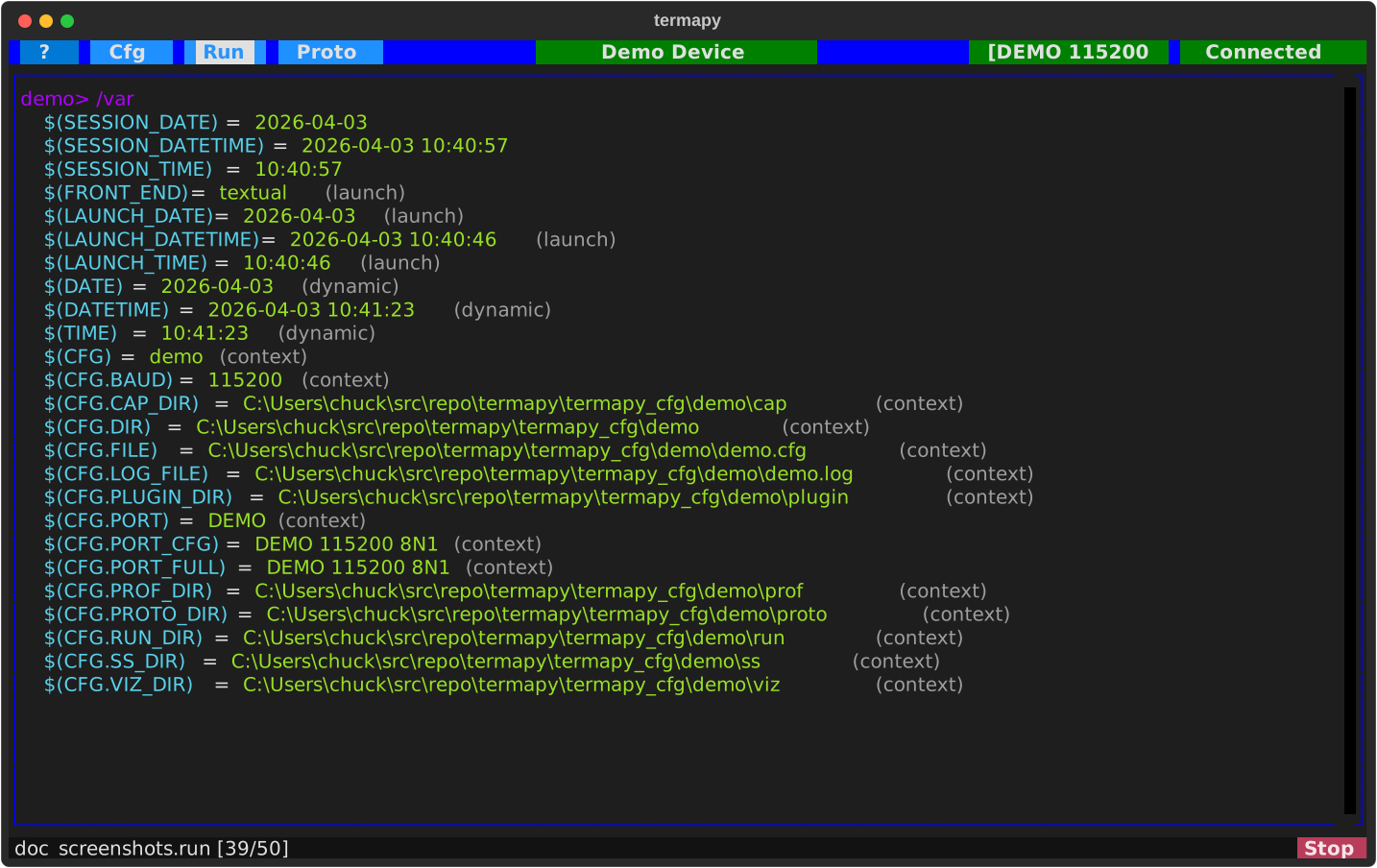
Termapy has a variable system that lets you define, expand, and reuse
values across commands, scripts, and config fields. Variables use
$(NAME) syntax.
Setting variables
Assign variables directly at the command line (no / prefix needed):
Or use the REPL command:
Capturing command output
Use <- to run a command and store its result in a variable. The
right-hand side is executed - as a REPL command (if it starts with
/) or as a device command (sent to the serial port) - and the
response is captured.
$(BAUD) <- /port.baud_rate    # captures REPL command output
$(TEMP) <- AT+TEMP            # captures device response
Using variables
Variables expand anywhere: serial commands, REPL commands, scripts:
$(*NAME) - one argument, whatever it holds
$(NAME) is expanded before the line is split into arguments, so its value
is text: if the value contains spaces it becomes several arguments. $(*NAME) -
star inside the parens - is resolved after the split, so it is always
exactly one argument.
$(FRAME) = 01 03 00 00 00 0a c5 cd

/proto.crc.detect $(FRAME)     # splice: 8 arguments, so 8 frames
/proto.crc.detect $(*FRAME)    # deref:  1 argument,  so 1 frame
Since termapy has no quoting, this is the way to put a space (or a newline) in a single argument.
The rule to remember: $(NAME) is text, $(*NAME) is one argument.
A $(*NAME) reference is recognized only when it is an entire argument:
| Case | Behavior |
|---|---|
$(*NAME) or $(*NAME:fmt) as a whole argument |
resolved; becomes exactly one argument |
| value contains spaces or newlines | one argument, content preserved verbatim |
| value is the empty string | binds an empty argument (a splice would contribute none) |
| name is undefined | error: unknown variable: 'NAME' |
x$(*a)y, --out=$(*f) |
error: invalid reference - it must be the whole argument |
a token that merely contains $(* |
left literal (a regex like \$\(\* is safe) |
resolved value contains $(X) or {seq1+} |
used verbatim - resolved values are never re-scanned |
It works in any command that declares typed parameters, in every argument slot
except a rest value (a rest value is a whole line, not an argument, so it
has no arity to guarantee - use $(NAME) there). Commands that take their
arguments literally - /raw, /term.send, /var.set, /search - are
unaffected by both forms.
Because it resolves after the argument split, a dereferenced value is always
data: one that happens to read --verbose or note=x or {seq1+} binds as a
value and cannot become a flag, a keyword, or a counter bump.
Built-in variables
| Variable | Type | Description |
|---|---|---|
$(DATE) |
Dynamic | Current date (YYYY-MM-DD) |
$(TIME) |
Dynamic | Current time (HH:MM:SS) |
$(DATETIME) |
Dynamic | Current date and time |
$(CFG.DIR) |
Context | Config folder (termapy_cfg/<name>/) |
$(CFG.FILE) |
Context | Config file path |
$(CFG.RUN_DIR) |
Context | run/ folder (also PROTO_DIR, PLUGIN_DIR, SS_DIR, CAP_DIR, PROF_DIR, VIZ_DIR) |
$(CFG.LOG_FILE) |
Context | Session log path |
$(CFG.PORT) |
Context | Configured port (CFG.BAUD the baud; CFG.PORT_CFG / CFG.PORT_FULL the short / full connection strings) |
$(LAUNCH_DATE) |
Launch | App start date (frozen) |
$(LAUNCH_TIME) |
Launch | App start time (frozen) |
$(LAUNCH_DATETIME) |
Launch | App start date and time (frozen) |
$(SESSION_DATE) |
Session | Script start date (frozen) |
$(SESSION_TIME) |
Session | Script start time (frozen) |
$(SESSION_DATETIME) |
Session | Script start date and time (frozen) |
$(FRONT_END) |
Launch | textual (TUI), cli, or mcp |
Dynamic variables update each time they are expanded. Launch variables are frozen when the app starts. Session variables are set once when a script launches from the Scripts button or Run menu.
Custom time formats
Any datetime variable accepts a strftime format after a colon. The
format runs to the closing paren and may contain its own colons:
$(DATETIME:%Y%m%d_%H%M%S)   # 20260707_143000 -- filename-safe (no colons)
$(TIME:%H%M)                # 1430
$(SESSION_DATE:%d-%b)       # 07-Jul -- works on frozen vars too
This is the way to get a colon-free timestamp for filenames, since the
default $(DATETIME) (2026-07-07 14:30:00) contains colons and spaces.
Environment variables
Access OS environment variables with $(env.NAME) syntax. This is
especially useful in config files for values that differ per machine:
The | inside the $(env.NAME|...) provides a fallback when the
env variable is unset. Without a fallback, a reference to an unset
variable in a REPL command is an error; in a config value it is left
as-is.
Env expansion composes with port-resolution fallback
For the port field specifically there is a second, independent |
that lives at the port-resolution layer: termapy splits the port
value on | at open time and tries each candidate (device name or
USB serial number) in order. These layers compose cleanly -- env
expansion runs first, then port resolution:
$(env.DEVICE_SN)expands to the env value (or stays as the placeholder if unset).- The resulting string is fed to port resolution, which tries the
SN first and
COM3if it doesn't match.
Both forms are valid and do slightly different things:
"port": "$(env.DEVICE_SN|COM4)"-- env-layer fallback. IfDEVICE_SNis unset, the value is literallyCOM4."port": "$(env.DEVICE_SN)|COM3"-- port-resolution fallback. The env value (whatever it is, even a wrong SN) is tried first, thenCOM3if resolution fails. The idiomatic form for port specs.
Env vars never reach the wire automatically
$(env.NAME) expands in config values (like port above) and in REPL
commands (/print $(env.HOME), /var.set x $(env.TOKEN)), but not in
bare device commands -- typing AT+X=$(env.SECRET) sends the literal
text, never the value, so environment secrets stay off the serial wire.
The on_connect_cmd family (on_connect_cmd, tui_/cli_/mcp_on_connect_cmd)
follows exactly this rule: each line is dispatched as if you had typed it,
so /-commands in it expand $(env.X) while device commands do not. They
are deliberately not pre-expanded at config-load time -- if you need an
env value in a connect-time device command, put it in a user variable via a
/-command first ($(NAME) user variables do expand on the wire).
See ports.md for the full port-spec grammar, and Using with Git for team workflow details.
| Command | Description |
|---|---|
/env.list {pattern} |
List environment variables |
/env.set <n> <v> |
Set a session-scoped environment variable |
/env.reload |
Re-snapshot variables from the OS |
Template placeholders
Curly-brace {} placeholders are per-script-run stamps: the
auto-incrementing sequence counters plus this run's start time and elapsed
time. They are the counterpart to $(NAME) variables, which substitute
ambient values (config, environment, wall-clock). The rule:
{}= per-run: counters ({seqN}), run start ({starttime}), elapsed ({elapsed}). Refreshed at each outermost script boundary.$()= ambient: everything else, including the wall clock. For a current-time stamp use$(DATETIME:...), not a{}placeholder.
/ss.svg capture_{seq1+}          # capture_1.svg, capture_2.svg, ...
AT+READ {seq2+}                  # independent counter
/print done in {elapsed}
| Placeholder | Description |
|---|---|
{seqN+} |
Increment counter N (1--9) and substitute the new value |
{seqN} |
Substitute counter N without incrementing |
{starttime} |
This run's start stamp, frozen at script (or app) start |
{elapsed} |
Time since start (e.g. 1.5s, 2hr), via the duration formatter |
seq1 is the top level; incrementing counter N resets all deeper
(higher-numbered) counters to 0, so bumping an outer level restarts the inner
ones. {starttime} and {elapsed} measure from script start inside a run, or
from app start when typed interactively.
The former
{datetime}and{clock}placeholders were retired: they were ambient wall-clock stamps, so they moved to$()as$(DATETIME:%Y%m%d_%H%M%S)and$(TIME). Old scripts and configs are rewritten automatically.
| Command | Description |
|---|---|
/seq |
Show all sequence counter values |
/seq.reset |
Reset all counters to zero |
Variable commands
| Command | Description |
|---|---|
/var (or /var.list) |
List all variables |
/var NAME |
Show one variable |
/var.set <NAME> <v> |
Set a variable to a literal value |
/var.capture <NAME> <cmd> |
Run cmd and store its result as NAME |
/var.clear |
Clear all user variables |
Escaping
Use \$ to prevent expansion:
Use /raw to send a line with no expansion at all:
Scope
User variables persist for the session. They are cleared automatically
when a script launches from the Scripts button or Run menu, but NOT
when /run is typed interactively. Use /var.clear to reset manually.