VT100 mode
Most serial devices speak in plain lines, and termapy's TUI and CLI handle those
well. Some devices emit terminal control beyond plain lines: cursor
addressing, full-screen menus, vi or top on an embedded Linux console,
BIOS/serial-over-LAN consoles, bootloader UIs. --vt100 is for those.
Try it without hardware
In VT100 mode, --demo connects to a simulated VT100 device (not the
line-oriented AT device that --demo selects in TUI/CLI mode). It draws a
colored, cursor-addressed UI you drive from the keyboard:
- Main menu - Up/Down arrows (or
j/k) move the highlighted selection; Enter opens it.
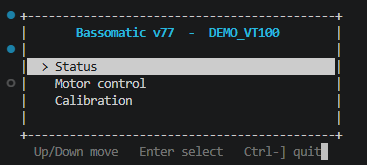
- Status dashboard - select Status to drill into a live gauge view that
redraws in place;
q(or Backspace) returns to the menu.
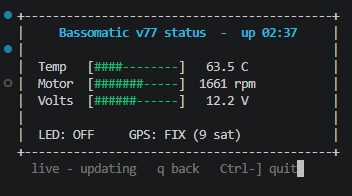
Quit with Ctrl-]. This is the quickest way to see what passthrough mode buys you over plain line output.
What it does
--vt100 drops the TUI entirely and pipes the device straight to your terminal.
termapy does not emulate the terminal here - your terminal already is one, so
it does the rendering. That keeps it a thin passthrough rather than a UI widget,
which is also why it works the same on Windows, macOS, and Linux: the byte pump is
the vendored pyserial miniterm, which enables VT processing on Windows 10+
automatically.
It's a peer of CLI and TUI mode, selected the same way:
- Flag:
--vt100(overrides the config, like--cli). - Config:
"default_ui": "vt100"makes it the default when no mode flag is given.
Precedence is --cli > --vt100 > config default_ui > the tui default.
Switching from the TUI
VT100 mode is a reversible toggle from inside the TUI, like /cli <-> /tui:
/vt100- hand the current device to a passthrough terminal./demo.vt100- jump to the built-inDEMO_VT100widget tour (see below), whatever device you had loaded.
In both cases Ctrl-] returns you to the TUI, on the same config you left
(when launched from the shell with --vt100, Ctrl-] quits the process instead -
there's no TUI to return to).
Keys
| Key | Action |
|---|---|
Ctrl+] |
Exit (or back to the TUI, if entered from it) |
Every other keystroke goes straight to the device - including Ctrl+S
and Ctrl+T, which are termapy's screenshot keys in TUI mode.
(termapy runs the cross-platform pyserial pump under the hood, but its
settings menu is disabled so the session reads as a native termapy view.)
Caveats
- Needs a VT-capable host terminal. Universal on macOS/Linux; on Windows use
Windows Terminal, VS Code, or any Win10+ console. Legacy
conhostis unreliable. - Run it in a standalone terminal tab for zero extra key interception. VS Code's integrated terminal adds one layer (the same one any serial terminal faces there) - see Environment & compatibility.
- For LLM-driven menu navigation, raw passthrough is the wrong tool. A headless terminal emulator exposed over MCP is the intended path, so the model sends key names and reads a clean rendered screen rather than parsing escape sequences.
When not to use it
If the device has a command or JSON API, prefer that (TUI/CLI/MCP). A
screen-and-keystroke interface is harder to script and harder to safety-gate than
a named-command API. --vt100 is the fallback for interface-poor devices, not the
default way to drive hardware.